
As organizations strengthen cybersecurity, there’s growing recognition that physical access is just as critical to secure. Doors, offices, data centers, and restricted areas are all potential entry points—not just for people, but for risk.
That’s where multi-factor authentication (MFA) for physical access comes in. By requiring more than one form of verification, MFA adds a powerful layer of protection that goes beyond traditional ID badges or keycards.
This article breaks down why MFA is becoming essential, the challenges it solves, and how to implement it using modern access control technologies available through ID card and badging solutions.
What Is Multi-Factor Authentication for Physical Access?
Multi-factor authentication (MFA) requires users to verify their identity using two or more of the following factors:
- Something you have → ID badge, smart card, mobile credential
- Something you know → PIN or password
- Something you are → biometric data (fingerprint, facial recognition)
For example:
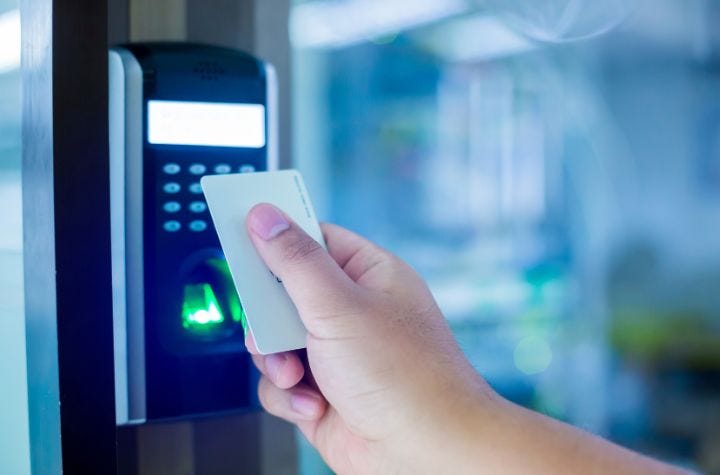
- Tap an RFID badge + enter a PIN
- Use a mobile credential + biometric verification on a smartphone
This layered approach significantly reduces the risk of unauthorized access.
Why MFA for Physical Access Is Growing
Organizations are moving toward MFA for physical security due to several converging trends:
1. Convergence of Physical and Cybersecurity
Security is no longer siloed. Physical access points are now part of broader identity and access management (IAM) strategies.
2. Zero Trust Security Models
Modern security frameworks assume no one is trusted by default—even inside the building. MFA supports this by requiring continuous verification.
3. Increase in Credential Theft & Misuse
Lost, stolen, or shared ID badges are common vulnerabilities. MFA ensures that a badge alone isn’t enough.
4. Compliance & Audit Requirements
Industries like healthcare, finance, and government often require strong authentication controls for sensitive areas.
Challenges MFA Helps Solve
Implementing MFA isn’t just about security—it directly addresses real operational risks:
Eliminates Single-Point Failure: A lost badge no longer grants immediate access.
Prevents Credential Sharing: Employees can’t simply hand off a badge without the second factor.
Secures High-Risk Areas: Server rooms, labs, and executive offices gain stronger protection.
Improves Audit Trails: Multiple authentication steps create more reliable access logs.
Reduces Insider Threat Risk: Adds friction where it matters—without slowing down everyday workflows.
Technologies That Enable MFA for Physical Access
To implement MFA, organizations combine multiple technologies—many of which are available through ID badging and access control ecosystems.
1. Smart ID Cards & RFID Credentials
Modern ID cards go beyond visual identification. They can store encrypted data and communicate with access control systems.
Examples:
- Contactless RFID cards
- Smart cards with secure chips
- High-frequency credentials for enhanced security
Tip: These act as the “something you have” factor.
2. Access Control Readers (Multi-Tech & Keypad)
Readers are installed at entry points and validate credentials.
Key capabilities:
- Card + PIN entry (badge + keypad)
- Multi-technology support (RFID, smart cards, mobile)
- Integration with access control software
Tip: These enable two-factor authentication at the door.
3. Mobile Credentials & Smartphone Access
Mobile credentials are rapidly growing as a secure alternative to physical cards.
Benefits:
- Stored securely on smartphones
- Can require phone unlock (biometric or PIN)
- Easy to provision and revoke remotely
Tip: Combines something you have (phone) + something you are/know (biometric/PIN).

4. Biometric Authentication Devices
Biometric readers add a third layer of security.
Examples:
- Fingerprint scanners
- Facial recognition systems
Tip: These provide the “something you are” factor for high-security environments.
5. ID Card Printers & Issuance Systems
Behind every secure credential is a reliable issuance process.
- ID card printers produce secure badges
- Software manages user identities and permissions
- Encoding capabilities allow integration with access systems
These tools ensure credentials are issued, managed, and tracked securely.
How to Launch an MFA Physical Access Program
Implementing MFA doesn’t have to be overwhelming. A phased approach works best:
Step 1: Identify High-Security Areas
Start with:
- Data centers
- IT rooms
- Executive offices
- Compliance-sensitive areas
Step 2: Choose Your Authentication Factors
Common combinations:
- Badge + PIN
- Badge + biometric
- Mobile credential + biometric
Step 3: Upgrade Readers & Infrastructure
Install:
- Multi-tech readers
- Keypad-enabled readers
- Mobile-compatible readers
Step 4: Issue Secure Credentials
Use:
- RFID or smart cards
- Mobile credential platforms
- Secure ID issuance software
Step 5: Integrate with Access Control Systems
Ensure your system:
- Logs access events
- Supports user provisioning
- Enables centralized management
Step 6: Train Users & Roll Out
Start with pilot groups, then expand across the organization.
How ID Wholesaler Supports MFA Deployment
Building a multi-factor access strategy requires more than just one product—it requires a complete ecosystem.
Through ID card and access control solutions, organizations can source:
- ID card printers for secure credential issuance
- RFID and smart cards for advanced authentication
- Access control readers with keypad and multi-tech support
- Mobile credential-compatible hardware
- Badge accessories for everyday use and durability
These components work together to create a scalable, secure identity and access program that aligns with modern security expectations.
Frequently Asked Questions
What is multi-factor authentication for physical access?
It’s a security method that requires two or more forms of verification (e.g., badge + PIN) to grant access to a physical space.
Is MFA necessary for all doors?
Not always. Many organizations apply MFA to high-risk or sensitive areas rather than every entry point.
Can mobile credentials replace ID cards?
Yes, in some cases. Many organizations use a hybrid approach with both physical and mobile credentials.
Does MFA slow down employees?
When implemented correctly, MFA adds minimal friction while significantly improving security.
What industries benefit most from MFA?
Healthcare, finance, government, and enterprise organizations with sensitive data or compliance requirements.
What’s the easiest way to start?
Begin with badge + PIN at key entry points, then expand to mobile or biometric solutions over time.
Conclusion
As security threats evolve, relying on a single form of authentication is no longer enough. Multi-factor authentication for physical access provides a smarter, more resilient approach—protecting not just buildings, but the people, data, and assets inside them.
By combining secure credentials, advanced readers, and modern identity technologies, organizations can build an access control strategy that aligns with today’s Zero Trust security mindset—and is ready for what comes next.
Contact ID Wholesaler today to speak with an expert about enabling MFA into your access control protocol.