


This product is no longer available.
Similar Products


What's Included
- Software is shipped in a boxed CD
Download Free Trial
- Get Your FREE Trial(Work done in the Trial Version is retained for use in the Full Version when purchased.)
Asure ID Enterprise 7 is best suited for medium- to large-sized organizations with multiple operators who need to share their card data and designs over their corporate network. Asure ID Enterprise 7 features enhanced database connectivity with the ability to support a wide range of database types, including real-time external database connectivity with Live Link.
An intuitive, Microsoft Office-inspired interface
While Asure ID Enterprise 7 is powerful and feature-rich, it's also easy to use! The Microsoft Office-inspired interface shortens the learning curve and makes photo ID card design and data entry a snap! Frequently-used features are within easy reach on the Microsoft "ribbon"-inspired toolbar, while tabbed navigation allows you to easily switch between card design and data entry. Asure ID Enterprise 7 features simplified processes to make capturing and loading photos easy. You also have the flexibility to add a cardholder signature, a magnetic stripe, or a 1-D or 2-D barcode to store information specific to the cardholder.
User-friendly design tools
Keep your workspace organized with pop-out control palettes that allow you to hide colors and attributes until they are needed. A WYSIWYG (what-you-see-is-what-you-get) display shows you exactly how your card will look when printed. Asure ID Enterprise 7 even "remembers" where you left; at startup, Asure ID will load the last template you used. You can even set conditional design and print rules to ensure a consistent card design.
Data at your fingertips (internal database, SQL, DVTEL)
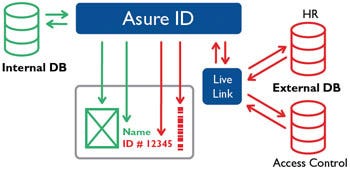
The built-in Microsoft Access database in Asure ID Enterprise 7 software allows you to store your templates and cardholder data. The Live Link feature also allows you to access real-time data from most third party database applications. Asure ID Enterprise 7 expands database connectivity and networking with support for Microsoft Access and SQL databases and ODBC import. A Quick Filter option allows you to quickly access any field within the database, plus Global Find extends this convenience across all linked databases and templates.
Customized reporting
Manipulating data with filtering, sorting and grouping is easier than ever with Asure ID Enterprise 7! You'll easily create and save standard and custom reports.
Optional SIF Agent add-on
Asure ID 7 Enterprise meets the Schools Interoperability Framework (SIF) standard, allowing consistent data sharing and eliminating double data entry and inconsistencies across other SIF-compliant schools and districts.
Increased security with password protection
Ensure only authorized users have access to your Asure ID 7 Enterprise ID software program with built-in password protection. It also allows you to define access privileges for each user.
Automatic notification of updates
With Asure ID 7, you'll stay up-to-date with automatic notifications of free software updates. With this, your ID software will never be outdated and you'll always have access to the latest features.
Easy to upgrade
When your needs grow to include technology card support, simply upgrade to the Asure ID Exchange edition.
| Card Management | Import images Add signatures Integrated photo capture Add unlimited data fields |
|---|---|
| Database | Microsoft Access Internal database with unlimited records LiveLink™ to local database |
| Encoding | 1-D (linear) and 2-D barcodes Magnetic stripe |
| Printing Capability | Full-color one-sided or two-sided (duplex) capabilities Batch printing |
| System Requirements | 1 gigahertz (GHz) Intel or faster Windows 7 (32- & 64-bit) Windows 8 (32- & 64-bit) Windows 10 (32- & 64-bit) |
Brochures
HID Asure ID 86413 Enterprise Software
HID Asure ID 86413 Enterprise Software Downloads
Download the latest free upgrade of Asure ID Enterprise:- Asure ID Download
HID Asure ID 86413 Enterprise Software User Manuals
Find the latest version of the user manual & other helpful downloads linked below:- Asure ID User Manual
- Asure ID Quick-Start Guide
Technical Support
Our team is able to assist you 7:30am-4:00pm CT, Monday-Friday.- See our technical support page for contact options